Agents > Inference & providers
Agent model choice
Choose from a curated set of top LLMs for Warp's Agents (or let Warp auto-select the best model).
Choose a model for your agents, use Auto for dynamic selection, or define a custom router. Models support reasoning levels and per-profile defaults.
Available models
Section titled “Available models”The model_id values shown below can be used when configuring models via the Automation Platform or CLI.
Auto models
Section titled “Auto models”| Model | model_id | Description |
|---|---|---|
| Auto (Responsive) | auto | Selects the highest-quality, fastest available model. Can cost more than cost-efficient options. |
| Auto (Cost-efficient) | auto-efficient | Optimizes for lower inference cost while maintaining output quality. |
| Auto (Genius) | auto-genius | Adapts to task complexity and selects Warp’s most capable model when it’s worth it. Best for deep debugging, architecture decisions, and /plan sessions. |
| Auto (Open-weights) | auto-open | Routes between the best open-source models available in Warp. Optimizes for low cost and fast speed using open-weights models. |
OpenAI
Section titled “OpenAI”The low, medium, high, xhigh, and max suffixes select increasing reasoning levels.
| Model | Supported model_id values |
|---|---|
| GPT-6 Astra | gpt-6-astra-low, gpt-6-astra-medium, gpt-6-astra-high, gpt-6-astra-xhigh, gpt-6-astra-max |
| GPT-6.1 Sol | gpt-6-1-sol-low, gpt-6-1-sol-medium, gpt-6-1-sol-high, gpt-6-1-sol-xhigh, gpt-6-1-sol-max |
| GPT-6.1 Terra | gpt-6-1-terra-low, gpt-6-1-terra-medium, gpt-6-1-terra-high, gpt-6-1-terra-xhigh |
| GPT-6 Sol | gpt-6-sol-low, gpt-6-sol-medium, gpt-6-sol-high, gpt-6-sol-xhigh, gpt-6-sol-max |
| GPT-6 Luna | gpt-6-luna-low, gpt-6-luna-medium, gpt-6-luna-high, gpt-6-luna-xhigh, gpt-6-luna-max |
| GPT-5.6 Sol | gpt-5-6-sol-low, gpt-5-6-sol-medium, gpt-5-6-sol-high, gpt-5-6-sol-xhigh |
| GPT-5.6 Terra | gpt-5-6-terra-low, gpt-5-6-terra-medium, gpt-5-6-terra-high, gpt-5-6-terra-xhigh |
| GPT-5.6 Luna | gpt-5-6-luna-low, gpt-5-6-luna-medium, gpt-5-6-luna-high, gpt-5-6-luna-xhigh |
| GPT-5.5 | gpt-5-5-low, gpt-5-5-medium, gpt-5-5-high, gpt-5-5-xhigh |
| GPT-5.4 | gpt-5-4-low, gpt-5-4-medium, gpt-5-4-high, gpt-5-4-xhigh |
To use eligible OpenAI models through your ChatGPT plan, connect a ChatGPT subscription and select a specific OpenAI model.
Anthropic
Section titled “Anthropic”Suffixes select effort level. xhigh-fast enables fast mode, and thinking enables thinking. The default ID for each family is listed separately where one exists.
| Model | Supported model_id values | Default model_id |
|---|---|---|
| Claude Opus 5.5 | claude-5-5-opus-low, claude-5-5-opus-medium, claude-5-5-opus-high, claude-5-5-opus-xhigh, claude-5-5-opus-xhigh-fast, claude-5-5-opus-max | claude-5-5-opus-high |
| Claude Opus 5 | claude-5-opus-low, claude-5-opus-medium, claude-5-opus-high, claude-5-opus-xhigh, claude-5-opus-xhigh-fast, claude-5-opus-max | claude-5-opus-high |
| Claude Fable 5.2 | claude-5-2-fable-low, claude-5-2-fable-medium, claude-5-2-fable-high, claude-5-2-fable-xhigh, claude-5-2-fable-max | Choose an effort-specific ID |
| Claude Fable 5.1 | claude-5-1-fable-low, claude-5-1-fable-medium, claude-5-1-fable-high, claude-5-1-fable-xhigh, claude-5-1-fable-max | claude-5-1-fable-high |
| Claude Fable 5 | claude-5-fable-low, claude-5-fable-medium, claude-5-fable-high, claude-5-fable-xhigh, claude-5-fable-max | claude-5-fable-high |
| Claude Sonnet 5.5 | claude-5-5-sonnet-low, claude-5-5-sonnet-medium, claude-5-5-sonnet-high, claude-5-5-sonnet-xhigh, claude-5-5-sonnet-max | claude-5-5-sonnet-xhigh |
| Claude Sonnet 5 | claude-5-sonnet-low, claude-5-sonnet-medium, claude-5-sonnet-high, claude-5-sonnet-xhigh, claude-5-sonnet-max | claude-5-sonnet-xhigh |
| Claude Opus 4.8 | claude-4-8-opus-low, claude-4-8-opus-medium, claude-4-8-opus-high, claude-4-8-opus-xhigh, claude-4-8-opus-xhigh-fast, claude-4-8-opus-max | claude-4-8-opus-xhigh |
| Claude Opus 4.7 | claude-4-7-opus-high, claude-4-7-opus-xhigh, claude-4-7-opus-max | claude-4-7-opus-xhigh |
| Claude Opus 4.6 | claude-4-6-opus-high, claude-4-6-opus-max | claude-4-6-opus-high |
| Claude Sonnet 4.6 | claude-4-6-sonnet-high, claude-4-6-sonnet-max | claude-4-6-sonnet-high |
| Claude Opus 4.5 | claude-4-5-opus, claude-4-5-opus-thinking | claude-4-5-opus |
| Claude Sonnet 4.5 | claude-4-5-sonnet, claude-4-5-sonnet-thinking | claude-4-5-sonnet |
| Claude Haiku 5.5 | claude-5-5-haiku-low, claude-5-5-haiku-medium, claude-5-5-haiku-high, claude-5-5-haiku-xhigh, claude-5-5-haiku-max | — |
| Claude Haiku 4.5 | claude-4-5-haiku | claude-4-5-haiku |
Claude Haiku 5.5 has no fixed default model_id; choose one of its effort-specific IDs.
| Model | model_id |
|---|---|
| Gemini 4 Argon | gemini-4-argon |
| Gemini 3.1 Pro | gemini-3.1-pro |
| Gemini 3.8 Flash | gemini-3.8-flash |
| Gemini 3.7 Flash | gemini-3.7-flash |
| Gemini 3.6 Flash | gemini-3.6-flash |
| Gemini 3.5 Flash | gemini-3.5-flash |
| Model | model_id | Reasoning Level |
|---|---|---|
| Grok 4.7 | grok-4-7-low | Low |
| Grok 4.7 | grok-4-7-medium | Medium |
| Grok 4.7 | grok-4-7-high | High |
| Grok 4.7 | grok-4-7-xhigh | Extra High |
| Grok 4.6 | grok-4-6-low | Low |
| Grok 4.6 | grok-4-6-medium | Medium |
| Grok 4.6 | grok-4-6-high | High |
| Grok 4.6 | grok-4-6-xhigh | Extra High |
| Grok 4.5 | grok-4-5-low | Low |
| Grok 4.5 | grok-4-5-medium | Medium |
| Grok 4.5 | grok-4-5-high | High |
| Grok 4.3 | grok-4-3-low | Low |
| Grok 4.3 | grok-4-3-medium | Medium |
| Grok 4.3 | grok-4-3-high | High |
| Grok Build 0.1 | grok-build-0.1 | — |
To use eligible Grok models without Warp-provided inference charges, connect your xAI account. See SuperGrok subscription for setup and other applicable charges.
Hosted models (via Fireworks AI)
Section titled “Hosted models (via Fireworks AI)”| Model | model_id |
|---|---|
| GLM 5.3 | glm-5.3-fireworks |
| GLM 5.3 Flash | glm-5.3-flash-fireworks |
| Kimi K3 | kimi-k3-fireworks |
| Minimax 3 | minimax-3-fireworks |
| Qwen 3.8 Max | qwen-3.8-max-fireworks |
| DeepSeek V4.1 Flash | deepseek-v4.1-flash-fireworks |
How to change models
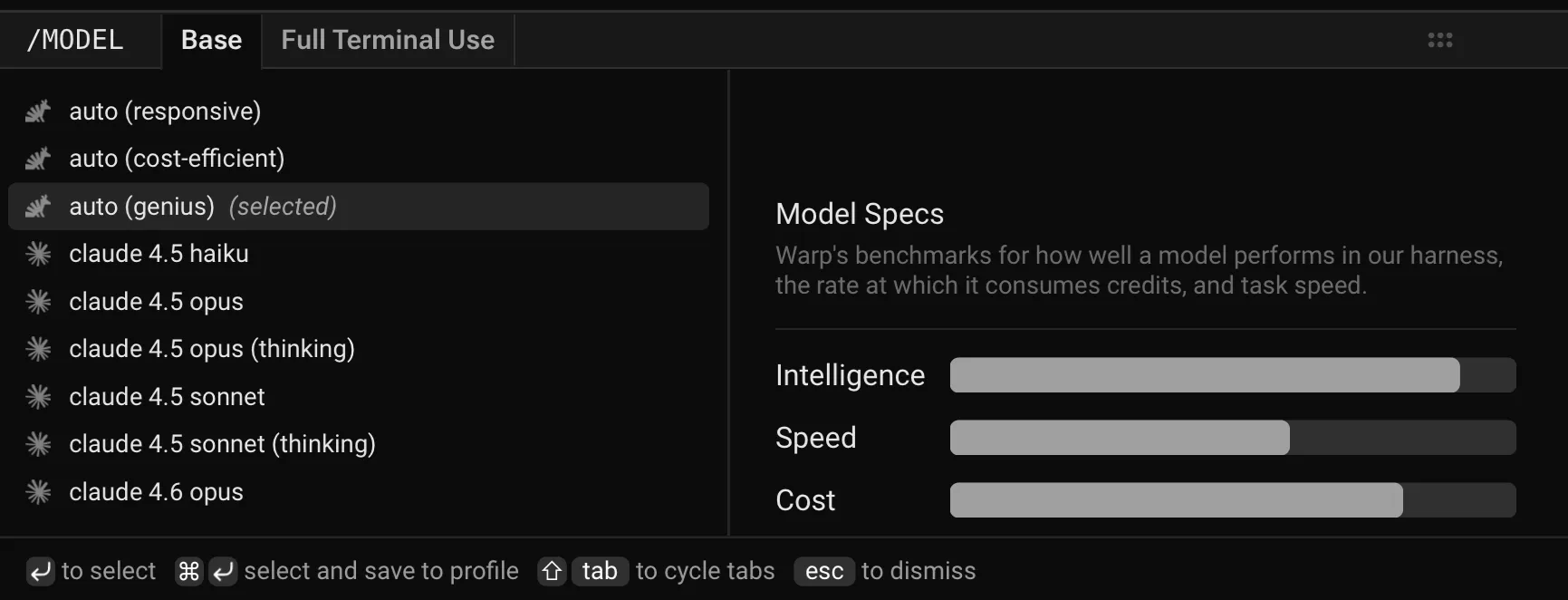
Section titled “How to change models”In the Warp app’s prompt input, click the displayed model name and choose a model. The selection persists for future prompts.
Custom routers
Section titled “Custom routers”Beyond the built-in Auto models, you can define your own custom routers that automatically route each task to a concrete model based on task complexity or rules you write. Custom routers appear in the model picker alongside Auto and individual models.
Add and manage custom routers in Settings > Agents > Warp Agent > Custom Routers. See Custom routers for details on creating one.
Model fallback
Section titled “Model fallback”If your selected model is unavailable, Warp uses a fallback from a predefined chain with comparable quality and capabilities. Warp switches back when the selected model becomes available.
Configuring models per Agent Profile
Section titled “Configuring models per Agent Profile”You can configure the base model for each Agent Profile, alongside the Agent’s autonomy, tool access, and other permissions. The base model is also used for Planning.
Edit your default profile or any other profile directly in Settings > Agents > Profiles.
Reviewing inference and privacy in Terminal
Section titled “Reviewing inference and privacy in Terminal”To use inference covered by provider ZDR, review the model and its inference source before sending sensitive content:
- In the Warp app’s prompt input, click the current model name. Choose a Warp-managed model that isn’t in the provider-retention exception list. If you use Auto, review automatic selection and fallback; Auto isn’t a pinned model.
- In the Warp app, open Settings > Agents > Profiles and review the active profile’s base model. If you use a custom router, review every target and its default model, not only the router’s name.
- In Settings > Agents > Warp Agent, review personal keys, endpoints, and connected subscriptions, and check any team-managed configuration. Search Settings for
API keysto find personal inference controls. For customer-managed inference, verify provider ZDR for the specific account, model, and configuration. Review BYOK fallback if enabled. - In Settings > Privacy, toggle off Help improve Warp if you don’t want analytics and improvement collection. Review Send crash reports and Store AI conversations in the cloud separately. The storage toggle controls personal Terminal conversation sync, not factory run storage.
Before sending the next prompt, confirm the intended model is displayed in the input. Recheck these choices when switching profiles, models, or inference providers. For cloud factory runs, use the factory review procedure instead.
Zero data retention policies
Section titled “Zero data retention policies”Warp’s provider Zero Data Retention (ZDR) agreements cover Warp-managed inference on all plans, in both Terminal and factory runs, except for the models listed below. Provider ZDR concerns prompts and responses at the inference provider; it doesn’t disable Warp analytics or product storage.
Auto selects models dynamically, and fallback can change the model serving a request. A primary model selection isn’t a complete inventory of auxiliary inference, such as Computer Use or Scorers. Review the applicable factory configuration as well.
Models requiring provider retention
Section titled “Models requiring provider retention”Anthropic requires retention for these models, including their effort variants, for safety, abuse monitoring, and compliance:
- Claude Fable 5
- Claude Fable 5.1
- Claude Fable 5.2
These models aren’t covered by provider ZDR even when Help improve Warp is off. For Enterprise teams, they are disabled by default and a workspace admin must enable them in the Admin Panel. Don’t rely on Enterprise defaults as a self-serve model restriction.
For your own keys, endpoints, subscriptions, or direct Claude Code and Codex calls, verify ZDR with the provider for your specific account, model, and configuration rather than applying Warp’s agreements to that traffic.